Transform Your Steam Deck: Multipurpose 6-in-1 Dock with HDMI, Ethernet & USB Hub
- by verilux in

The Steam Deck is more than just a handheld gaming device—it’s a powerful mini-computer capable of delivering console-quality gaming anywhere. However, many users quickly realize that a single USB-C port limits its full potential. That’s where a 6-in-1 Steam Deck dock comes in.6 in 1 usb cable.
This multipurpose dock transforms your Steam Deck into a complete gaming, entertainment, and productivity station. With HDMI output, fast Ethernet, multiple USB ports, and efficient charging, it works like a hyper 6 in 1 USB-C media hub, designed specifically for gamers who want flexibility without complexity.
What Exactly Is a 6-in-1 Steam Deck Dock?
A 6-in-1 Steam Deck dock is a compact docking station that expands one USB-C port into six essential connections. Instead of plugging in separate adapters or cables, you get an all-in-one solution that keeps your setup clean and efficient.
Core Interfaces Included
This multipurpose Steam Deck dock is equipped with HDMI 2.0 with 4K@30Hz video output, allowing you to connect your device to a TV, monitor, or projector for a sharp and immersive big-screen experience. It also features a Gigabit Ethernet port supporting speeds up to 1000 Mbps, ensuring fast, stable, and lag-free internet connectivity for online gaming, streaming, and downloads. Additionally, the dock includes three USB-A 3.0 ports, making it easy to connect controllers, keyboards, mice, external storage, and other peripherals while enjoying high-speed data transfer. To complete the setup, the USB-C Power Delivery port supports up to 100W input, enabling safe and efficient charging of your Steam Deck while all other functions are in use.
This makes it functionally similar to a 6 in 1 USB cable or 6 in 1 USB charging cable, but with far greater stability, power handling, and durability.

Experience Console-Style Gaming on a Bigger Screen
One of the most exciting features of this dock is HDMI output. Connecting your Steam Deck to a TV or monitor instantly elevates your gaming experience.
Why HDMI Output Matters
Connecting your Steam Deck to a larger display lets you enjoy immersive, detailed visuals that make games feel more engaging and lifelike. It’s ideal for laid-back couch gaming or exciting multiplayer sessions with friends and family, transforming your setup into a full console-style experience. At the same time, it’s ideal for streaming movies, TV shows, and gameplay content, giving you a versatile entertainment hub on the big screen.
With support for 4K resolution at 30Hz, the dock delivers sharp images and vibrant colors. Even at 1080p, users benefit from smoother frame rates and reduced input lag.
Say Goodbye to Lag with Gigabit Ethernet
Wireless connections can be inconsistent, especially in competitive gaming scenarios. The built-in Gigabit Ethernet port ensures a stable, high-speed wired connection.
Benefits of Wired Internet
With a stable wired connection, you benefit from faster game downloads and quicker updates, saving valuable time and keeping you ready to play. Lower ping in online games ensures smoother gameplay with reduced lag, which is especially important for competitive titles. In addition, reliable cloud gaming performance allows you to stream games consistently without interruptions, drops, or connection instability.
Supporting speeds up to 1000 Mbps, this feature is a major upgrade for serious gamers and streamers alike.

Fast, Safe Charging Without Interruptions
Charging while gaming is essential, especially during long sessions. This dock supports up to 100W Power Delivery, while the Steam Deck draws its optimal 45W charging speed safely.
Intelligent Power Management
The dock is designed to prevent overheating, keeping your Steam Deck cool even during extended gaming sessions. It maintains stable performance, ensuring that your games run smoothly without interruptions. At the same time, it allows you to charge your device while using all ports, so you can power multiple accessories, connect peripherals, and enjoy big-screen gaming without any compromise.
Think of it as a smarter, more powerful 6 in 1 USB charging cable—one connection powering everything efficiently.
Expand Your Setup with USB 3.0 Connectivity
The three USB-A 3.0 ports allow you to connect multiple accessories simultaneously without sacrificing speed.
Compatible Accessories
The dock’s three USB-A 3.0 ports let you connect a variety of peripherals to enhance your gaming and productivity setup. You can connect controllers and gamepads for accurate gameplay, use a keyboard and mouse for smooth navigation, and attach USB headsets or microphones for immersive sound and clear communication. It also supports external storage drives, making it simple to expand your library and transfer files quickly.
With high-speed data transfer, this dock also works as a productivity tool, making it useful beyond gaming.
Case-Friendly Design with Premium Build Quality
Many docks require removing your Steam Deck case—but not this one. It is designed to fit most protective cases comfortably.
Build and Design Advantages
The dock features a sturdy aluminum alloy construction that not only ensures durability but also enhances heat dissipation, keeping your Steam Deck cool during extended use. Its anti-slip base provides stability on any desk or surface, preventing accidental slips or movement. Despite its robust build, the dock maintains a compact and travel-friendly form, making it easy to carry and use anywhere, whether at home or on the go.
The sleek aluminum finish not only looks premium but also improves durability and cooling during extended use.

More Than Gaming: A True USB-C Media Hub
This dock isn’t limited to gaming alone. It functions as a hyper 6 in 1 USB-C media hub, making it ideal for:
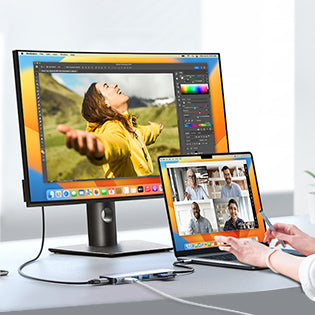
Beyond gaming, this dock serves as a versatile hub for productivity and entertainment. It’s perfect for office workstations, allowing you to connect multiple peripherals and monitors seamlessly. You can use it for video conferencing with clear audio and stable connections, efficiently transfer files between devices, and enjoy smooth media streaming, making it a comprehensive solution for both work and leisure.
If you already use 6 in 1 USB cables or hubs for laptops, this dock offers a familiar but more robust experience—optimized for Steam Deck users.
Who Should Choose This 6-in-1 Dock?
This dock is perfect for:
This 6-in-1 Steam Deck dock is ideal for gamers who want a true console-like experience on a larger screen. It also caters to users who prioritize fast, stable internet for online gaming and streaming. Streamers and content creators will appreciate its ability to connect multiple peripherals simultaneously, while anyone looking to reduce cable clutter will enjoy the convenience of having charging, data transfer, and display connections all in one compact device.
Frequently Asked Questions (FAQs)
Q1. Is this dock compatible with Steam Deck?
A1. Yes, the dock is specifically designed for seamless Steam Deck compatibility. It connects instantly without requiring additional drivers or setup.
Q2. Does the dock support 4K video output?
A2. Yes, it supports HDMI 2.0 with 4K resolution at 30Hz. Lower resolutions like 1080p offer smoother refresh rates.
Q3. Can I charge my Steam Deck while using the dock?
A3. Yes, the USB-C port supports power delivery up to 100W. Your Steam Deck safely draws its required 45W while in use.
Q4. Is wired Ethernet better than Wi-Fi for gaming?
A4. Yes, Gigabit Ethernet provides faster and more stable connectivity. It significantly reduces lag and connection drops during gameplay.
Q5. Will the dock fit my Steam Deck case?
A5. Yes, the dock is designed to be case-friendly. You do not need to remove most standard protective covers.
Q6. How many USB devices can I connect?
A6. You can connect up to three USB-A devices at once. This includes controllers, storage drives, and accessories.
Q7. Is the dock portable for travel?
A7. Yes, it features a compact and lightweight design. It easily fits into backpacks or travel cases.
Q8. Does the dock overheat during long sessions?
A8. No, the aluminum body improves heat dissipation. This keeps performance stable even during extended gaming.
Q9. Can it replace a regular USB-C hub?
A9. Yes, it works as a full USB-C media hub. It offers better power handling and gaming-focused features.
Q10. Is it suitable for work or office use?
A10. Yes, it’s ideal for external displays and peripherals. You can easily switch between gaming and productivity.
Verilux Customer Support Information
Verilux is a brand of PatPat Trading Private Limited and is backed by a dedicated support team ready to assist you.
Support Hours:
9 AM – 6 PM (Monday to Saturday)
All queries after working hours are answered the next working day.
Email: support@veriluxhub.com
Phone: +91-9218021484
- Posted in:
- 6 in 1 USB